

0:00 / 0:00
Important Update: Effective July 1, 2026, Zebra is implementing mandatory Multi-Factor Authentication (MFA) to enhance security. Learn more.
Desktop Printers
ZD421 Series Printer Support
MODELS: ZD421
The ZD411 printer is part of the ZD400 Series Printer family.
Retain proof of purchase for warranty confirmation.
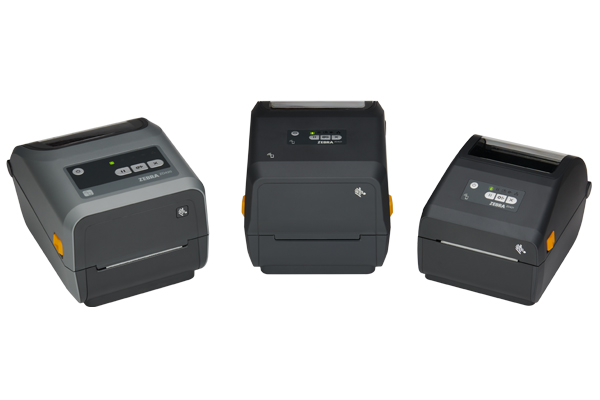
ZD421C, ZD421T, ZD421D
ATTENTION - Zebra Printer Customers in Europe, the Middle East, and Africa.
Recent changes have been made to the printer setup process - Learn More.
- Getting Started
- Downloads
- Documentation
- Videos
- Troubleshooting
- Application Software
- Additional Resources
The Setup guidelines below will take you to English documentation. You can access the localized User Guides in the DOCUMENTATION tab.
IMPORTANT! Do not connect your printer to a computer yet!
- If you connected your printer to a computer via USB before driver installation, the printer might appear as an unknown (unspecified) device in “Devices and Printers.”
- If necessary, follow these recovery steps before proceeding to Step 1.
1. Download and install the recommended Windows Printer Driver v10.
- Download the driver from the DOWNLOADS tab.
- Follow instructions in Installing the Drivers and Running the Printer Installation Wizard.
2. Download and install the Zebra Setup Utilities (ZSU) printer configuration utility.
3. Connect the printer to a USB port on your computer and power up.
- Peel off the sticker covering the USB port.
- See how you can use Zebra Setup Utilities to configure your printer for a wired or wireless connection.
- You may also refer to the VIDEOS tab for videos relating to serial/Ethernet options and cutter/dispenser options
4. Load media (media usually means labels, but it also includes tag stock, receipt paper, and other things that can be printed on).
- You can watch the video in the VIDEOS tab.
- The media settings must match the actual media that you are using.
How to identify media type.
5. When using thermal transfer media, load ribbon or insert ribbon cartridge.
- This step does not apply to the ZD421 direct thermal printer.
- You can watch the videos in the VIDEOS tab.
- How to find out if you have thermal transfer media?
6. Run a SmartCal media calibration and print a configuration report. Videos are also available in the VIDEOS tab.
7. Manually calibrate ribbon and media sensors.
- When changing the size or type of media.
- If printing issues are observed, such as skipped labels, vertical image/label drift, or media out errors.
8. The printer settings must match the actual supplies that you are using for your print job and the options on your printer. Adjust the printer settings as necessary using Zebra Setup Utilities software or Windows Printer Driver v8
*Additional User Manuals relating to hardware and connectivity options are available in English in the DOCUMENTATION tab.
Peel off the sticker covering the USB port.

Documentation
Some documents may not have been translated to your language.
Oops!! Something went wrong. Please try again..

Sorry cant find any results
ZD421 Thermal Transfer Printer How-to Videos
ZD421 Direct Thermal Printer How-to Videos
0:00 / 0:00
ZD421 Ribbon Cartridge Printer How-to Videos
0:00 / 0:00
Application Software
Zebra software products that can enhance your experience with this device.
Oops!! Something went wrong. Please try again..
Sorry cant find any results
Additional Resources
Useful links and resources to enhance your experience.
Support Content
Join our community discussion forum where you can connect with Zebra users and ambassadors from around the globe.
Warranty and Repair
For some services, you will need a serial number. Here's where you can find it on your device.
Find the Serial Number of Your Zebra Product